> ## Documentation Index
> Fetch the complete documentation index at: https://hyperbrowser.ai/docs/llms.txt
> Use this file to discover all available pages before exploring further.
# Recordings
> Record and replay your browser sessions with web recordings and video replays
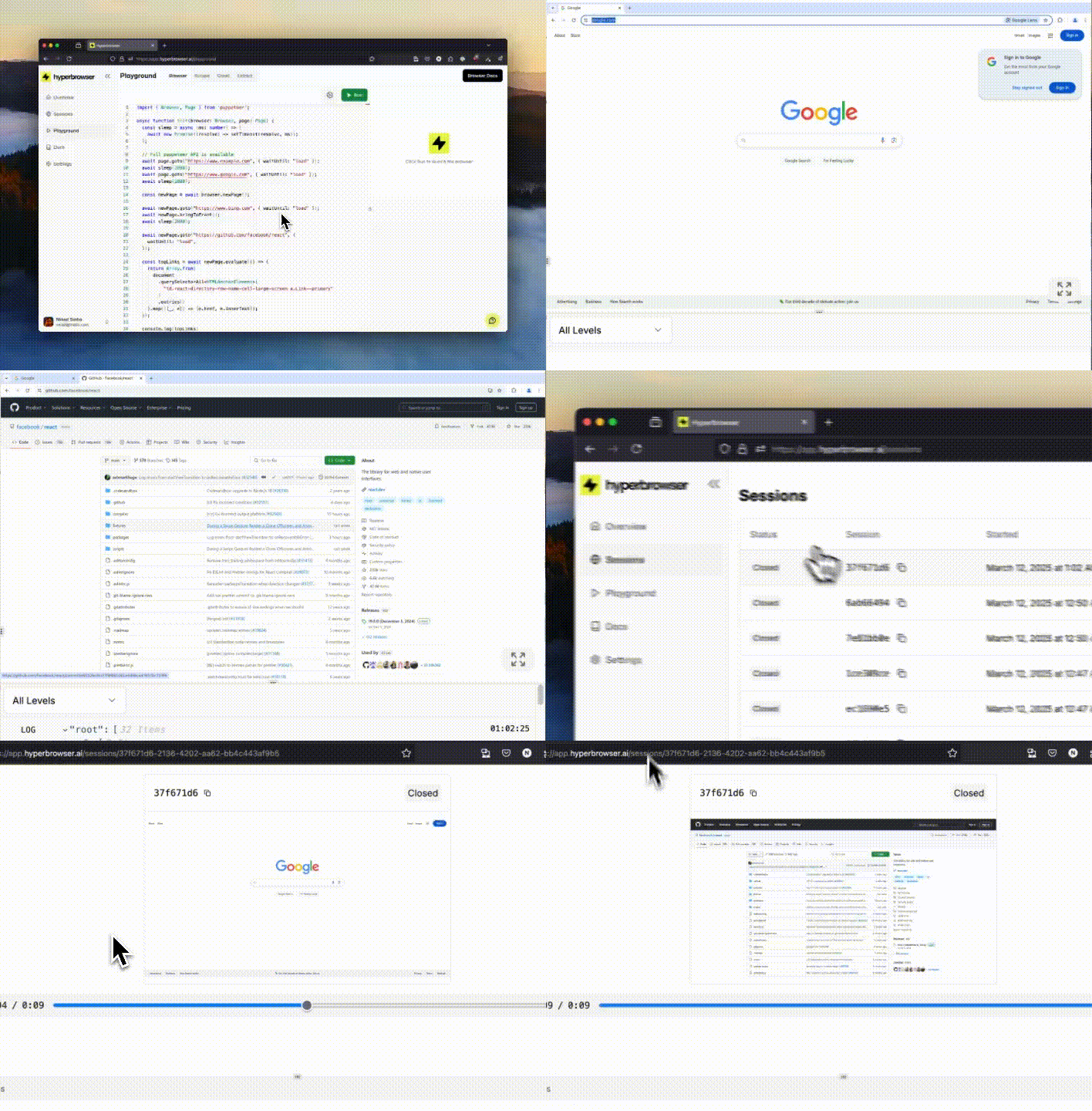
Record and replay your browser sessions to debug failures, analyze behavior, and share reproducible bug reports. Hyperbrowser supports both web recordings (using [rrweb](https://www.rrweb.io/)) that capture DOM changes and interactions in a lightweight format, and traditional MP4 video recordings for easy sharing.
## Recording Types
Hyperbrowser supports two types of recordings:
* **Web Recording (rrweb)**: Captures DOM changes, interactions, and network requests in a lightweight JSON format that can be replayed with the rrweb player
* **Video Recording (MP4)**: Records the session as a standard video file for easy sharing and viewing
## Enabling Session Recording
To record a session, set `enableWebRecording` to `true` when creating a new session. This will record all browser interactions, DOM changes, and network requests for the duration of the session.
The rrweb session recording is enabled by default, so you don't need to explicitly set the `enableWebRecording`/`enable_web_recording` parameter to `true`/`True`.
```typescript Node.js theme={null}
import { Hyperbrowser } from "@hyperbrowser/sdk";
const client = new Hyperbrowser({
apiKey: process.env.HYPERBROWSER_API_KEY,
});
const session = await client.sessions.create({
enableWebRecording: true,
});
console.log(`Session ID: ${session.id}`);
```
```python Python 1.0+ theme={null}
import os
from hyperbrowser import Hyperbrowser
client = Hyperbrowser(api_key=os.environ["HYPERBROWSER_API_KEY"])
session = client.sessions.create(params={"enable_web_recording": True})
print(f"Session ID: {session.id}")
```
```python Python (legacy) theme={null}
import os
from hyperbrowser import Hyperbrowser
from hyperbrowser.models import CreateSessionParams
client = Hyperbrowser(api_key=os.environ["HYPERBROWSER_API_KEY"])
session = client.sessions.create(params=CreateSessionParams(enable_web_recording=True))
print(f"Session ID: {session.id}")
```
```bash cURL theme={null}
curl -X POST 'https://api.hyperbrowser.ai/api/session' \
-H 'x-api-key: YOUR_API_KEY' \
-H 'Content-Type: application/json' \
-d '{
"enableWebRecording": true
}'
```
## Enabling Video Recording
To create a video screen recording (MP4 format), set both `enableWebRecording` and `enableVideoWebRecording` to `true`. Both must be set to `true`/`True`.
```typescript Node.js theme={null}
import { Hyperbrowser } from "@hyperbrowser/sdk";
const client = new Hyperbrowser({
apiKey: process.env.HYPERBROWSER_API_KEY,
});
const session = await client.sessions.create({
enableWebRecording: true,
enableVideoWebRecording: true,
});
console.log(`Session ID: ${session.id}`);
```
```python Python 1.0+ theme={null}
import os
from hyperbrowser import Hyperbrowser
client = Hyperbrowser(api_key=os.environ["HYPERBROWSER_API_KEY"])
session = client.sessions.create(
params={"enable_web_recording": True, "enable_video_web_recording": True}
)
print(f"Session ID: {session.id}")
```
```python Python (legacy) theme={null}
import os
from hyperbrowser import Hyperbrowser
from hyperbrowser.models import CreateSessionParams
client = Hyperbrowser(api_key=os.environ["HYPERBROWSER_API_KEY"])
session = client.sessions.create(
params=CreateSessionParams(
enable_web_recording=True, enable_video_web_recording=True
)
)
print(f"Session ID: {session.id}")
```
```bash cURL theme={null}
curl -X POST 'https://api.hyperbrowser.ai/api/session' \
-H 'x-api-key: YOUR_API_KEY' \
-H 'Content-Type: application/json' \
-d '{
"enableWebRecording": true,
"enableVideoWebRecording": true
}'
```
`enableWebRecording` must be `true` for video recording to work.
## Retrieving Recordings
To retrieve a recording, you need to:
1. Note the session `id` when you create the session
2. Ensure the session has been stopped before fetching the recording
3. Poll the recording URL endpoint until the status is `completed` or `failed`
### Get Web Recording URL
Retrieve the URL for the rrweb recording:
```typescript Node.js theme={null}
import { Hyperbrowser } from "@hyperbrowser/sdk";
const client = new Hyperbrowser({
apiKey: process.env.HYPERBROWSER_API_KEY,
});
// Poll until recording is ready
let recordingData = await client.sessions.getRecordingURL("session-id");
while (recordingData.status === "pending" || recordingData.status === "in_progress") {
console.log(`Recording status: ${recordingData.status}, waiting...`);
await new Promise(resolve => setTimeout(resolve, 1000));
recordingData = await client.sessions.getRecordingURL("session-id");
}
console.log(recordingData.status); // "not_enabled" | "completed" | "failed"
if (recordingData.status === "completed" && recordingData.recordingUrl) {
// Fetch the recording data
const response = await fetch(recordingData.recordingUrl);
const recordingEvents = await response.json();
console.log("Recording events:", recordingEvents);
} else if (recordingData.status === "failed") {
console.error("Recording failed:", recordingData.error);
}
```
```python Python theme={null}
import time
import requests
from hyperbrowser import Hyperbrowser
import os
client = Hyperbrowser(api_key=os.environ["HYPERBROWSER_API_KEY"])
# Poll until recording is ready
recording_data = client.sessions.get_recording_url("session-id")
while recording_data.status in ["pending", "in_progress"]:
print(f"Recording status: {recording_data.status}, waiting...")
time.sleep(1)
recording_data = client.sessions.get_recording_url("session-id")
print(f"Final status: {recording_data.status}")
if recording_data.status == "completed" and recording_data.recording_url:
response = requests.get(recording_data.recording_url)
recording_events = response.json()
print("Recording events:", recording_events)
elif recording_data.status == "failed":
print(f"Recording failed: {recording_data.error}")
```
```bash cURL theme={null}
curl -X GET 'https://api.hyperbrowser.ai/api/session/{sessionId}/recording-url' \
-H 'x-api-key: YOUR_API_KEY'
```
### Get Video Recording URL
Retrieve the URL for the video recording (MP4):
```typescript Node.js theme={null}
import { Hyperbrowser } from "@hyperbrowser/sdk";
const client = new Hyperbrowser({
apiKey: process.env.HYPERBROWSER_API_KEY,
});
// Poll until video recording is ready
let recordingData = await client.sessions.getVideoRecordingURL("session-id");
while (recordingData.status === "pending" || recordingData.status === "in_progress") {
console.log(`Video recording status: ${recordingData.status}, waiting...`);
await new Promise(resolve => setTimeout(resolve, 1000));
recordingData = await client.sessions.getVideoRecordingURL("session-id");
}
console.log(recordingData.status); // "not_enabled" | "completed" | "failed"
if (recordingData.status === "completed" && recordingData.recordingUrl) {
console.log(`Download video: ${recordingData.recordingUrl}`);
} else if (recordingData.status === "failed") {
console.error("Video recording failed:", recordingData.error);
}
```
```python Python theme={null}
import time
from hyperbrowser import Hyperbrowser
import os
client = Hyperbrowser(api_key=os.environ["HYPERBROWSER_API_KEY"])
# Poll until video recording is ready
recording_data = client.sessions.get_video_recording_url("session-id")
while recording_data.status in ["pending", "in_progress"]:
print(f"Video recording status: {recording_data.status}, waiting...")
time.sleep(1)
recording_data = client.sessions.get_video_recording_url("session-id")
print(f"Final status: {recording_data.status}")
if recording_data.status == "completed" and recording_data.recording_url:
print(f"Download video: {recording_data.recording_url}")
elif recording_data.status == "failed":
print(f"Video recording failed: {recording_data.error}")
```
```bash cURL theme={null}
curl -X GET 'https://api.hyperbrowser.ai/api/session/{sessionId}/video-recording-url' \
-H 'x-api-key: YOUR_API_KEY'
```
### Response Format
Both recording endpoints return the same response structure:
```json theme={null}
{
"status": "completed",
"recordingUrl": "https://...",
"error": null
}
```
**Status values:**
* `not_enabled` - Recording was not enabled for this session
* `pending` - Recording is queued for processing
* `in_progress` - Recording is being processed
* `completed` - Recording is ready (check `recordingUrl`)
* `failed` - Recording failed (check `error` for details)
## Replaying rrweb Recordings
### Using the rrweb Player
Once you have the recording data, you can replay it using rrweb's player:
```html theme={null}
```
This launches an interactive player UI that allows you to play, pause, rewind, and inspect the recorded session.
### Building a Custom Player
You can also use rrweb's APIs to build your own playback UI. Refer to the [rrweb documentation](https://github.com/rrweb-io/rrweb/blob/master/guide.md#replay) for details on customizing the Replayer.
## Complete Example
Here's a full workflow that creates a session, performs automation, and retrieves the recording:
```typescript Node.js theme={null}
import { Hyperbrowser } from "@hyperbrowser/sdk";
import { chromium } from "playwright-core";
import { config } from "dotenv";
config();
const client = new Hyperbrowser({
apiKey: process.env.HYPERBROWSER_API_KEY,
});
async function sleep(ms: number) {
return new Promise((resolve) => setTimeout(resolve, ms));
}
async function runWithRecording() {
// Create session with recording enabled
const session = await client.sessions.create({
enableWebRecording: true,
enableVideoWebRecording: true,
});
console.log(`Session created: ${session.id}`);
try {
// Connect and run automation
const browser = await chromium.connectOverCDP(session.wsEndpoint);
const defaultContext = browser.contexts()[0];
const page = defaultContext.pages()[0];
await page.goto("https://example.com");
await page.click("a");
await page.goto("https://hackernews.com");
} catch (error) {
console.error("Error during automation:", error);
} finally {
// Stop the session
await client.sessions.stop(session.id);
}
// Poll for web recording
console.log("Waiting for web recording to be processed...");
let webRecording = await client.sessions.getRecordingURL(session.id);
while (
webRecording.status === "pending" ||
webRecording.status === "in_progress"
) {
await sleep(1000);
webRecording = await client.sessions.getRecordingURL(session.id);
}
if (webRecording.status === "completed") {
console.log(`Web recording: ${webRecording.recordingUrl}`);
} else if (webRecording.status === "failed") {
console.error("Web recording failed:", webRecording.error);
}
// Poll for video recording
console.log("Waiting for video recording to be processed...");
let videoRecording = await client.sessions.getVideoRecordingURL(session.id);
while (
videoRecording.status === "pending" ||
videoRecording.status === "in_progress"
) {
await sleep(1000);
videoRecording = await client.sessions.getVideoRecordingURL(session.id);
}
if (videoRecording.status === "completed") {
console.log(`Video recording: ${videoRecording.recordingUrl}`);
} else if (videoRecording.status === "failed") {
console.error("Video recording failed:", videoRecording.error);
}
}
runWithRecording();
```
```python Python 1.0+ theme={null}
import asyncio
from hyperbrowser import AsyncHyperbrowser
from playwright.async_api import async_playwright
import os
from dotenv import load_dotenv
load_dotenv()
client = AsyncHyperbrowser(api_key=os.environ["HYPERBROWSER_API_KEY"])
async def run_with_recording():
# Create session with recording enabled
session = await client.sessions.create(
params={
"enable_web_recording": True,
"enable_video_web_recording": True,
}
)
print(f"Session created: {session.id}")
try:
# Connect and run automation
async with async_playwright() as p:
browser = await p.chromium.connect_over_cdp(session.ws_endpoint)
default_context = browser.contexts[0]
page = default_context.pages[0]
await page.goto("https://example.com")
await page.click("a")
await page.goto("https://hackernews.com")
except Exception as error:
print(f"Error during automation: {error}")
finally:
# Stop the session
await client.sessions.stop(session.id)
# Poll for web recording
print("Waiting for web recording to be processed...")
web_recording = await client.sessions.get_recording_url(session.id)
while web_recording.status in ["pending", "in_progress"]:
await asyncio.sleep(1)
web_recording = await client.sessions.get_recording_url(session.id)
if web_recording.status == "completed":
print(f"Web recording: {web_recording.recording_url}")
elif web_recording.status == "failed":
print(f"Web recording failed: {web_recording.error}")
# Poll for video recording
print("Waiting for video recording to be processed...")
video_recording = await client.sessions.get_video_recording_url(session.id)
while video_recording.status in ["pending", "in_progress"]:
await asyncio.sleep(1)
video_recording = await client.sessions.get_video_recording_url(session.id)
if video_recording.status == "completed":
print(f"Video recording: {video_recording.recording_url}")
elif video_recording.status == "failed":
print(f"Video recording failed: {video_recording.error}")
if __name__ == "__main__":
asyncio.run(run_with_recording())
```
```python Python (legacy) theme={null}
import asyncio
from hyperbrowser import AsyncHyperbrowser
from hyperbrowser.models import CreateSessionParams
from playwright.async_api import async_playwright
import os
from dotenv import load_dotenv
load_dotenv()
client = AsyncHyperbrowser(api_key=os.environ["HYPERBROWSER_API_KEY"])
async def run_with_recording():
# Create session with recording enabled
session = await client.sessions.create(
params=CreateSessionParams(
enable_web_recording=True,
enable_video_web_recording=True,
)
)
print(f"Session created: {session.id}")
try:
# Connect and run automation
async with async_playwright() as p:
browser = await p.chromium.connect_over_cdp(session.ws_endpoint)
default_context = browser.contexts[0]
page = default_context.pages[0]
await page.goto("https://example.com")
await page.click("a")
await page.goto("https://hackernews.com")
except Exception as error:
print(f"Error during automation: {error}")
finally:
# Stop the session
await client.sessions.stop(session.id)
# Poll for web recording
print("Waiting for web recording to be processed...")
web_recording = await client.sessions.get_recording_url(session.id)
while web_recording.status in ["pending", "in_progress"]:
await asyncio.sleep(1)
web_recording = await client.sessions.get_recording_url(session.id)
if web_recording.status == "completed":
print(f"Web recording: {web_recording.recording_url}")
elif web_recording.status == "failed":
print(f"Web recording failed: {web_recording.error}")
# Poll for video recording
print("Waiting for video recording to be processed...")
video_recording = await client.sessions.get_video_recording_url(session.id)
while video_recording.status in ["pending", "in_progress"]:
await asyncio.sleep(1)
video_recording = await client.sessions.get_video_recording_url(session.id)
if video_recording.status == "completed":
print(f"Video recording: {video_recording.recording_url}")
elif video_recording.status == "failed":
print(f"Video recording failed: {video_recording.error}")
if __name__ == "__main__":
asyncio.run(run_with_recording())
```
## Storage and Retention
Session recordings are stored securely in Hyperbrowser's cloud infrastructure. Recordings are retained according to your plan's data retention policy.
## Limitations
* Session recordings capture only the visual state of the page. They do not include server-side logs, database changes, or other non-DOM modifications.
* Recordings may not perfectly reproduce complex WebGL or canvas-based animations.
## Best Practices
1. **Always enable recordings for debugging**: Recordings are invaluable when troubleshooting automation failures
2. **Poll for completion**: After stopping a session, poll the recording URL endpoint until the status is `completed`
3. **Handle failures gracefully**: Check the `error` field if the status is `failed`
4. **Use video recordings for sharing**: MP4 videos are easier to share with non-technical stakeholders
## Next Steps
Watch sessions in real-time as they run
Save and retrieve files from sessions
Track session events and lifecycle
View all your session recordings
 ## Recording Types
Hyperbrowser supports two types of recordings:
* **Web Recording (rrweb)**: Captures DOM changes, interactions, and network requests in a lightweight JSON format that can be replayed with the rrweb player
* **Video Recording (MP4)**: Records the session as a standard video file for easy sharing and viewing
## Enabling Session Recording
To record a session, set `enableWebRecording` to `true` when creating a new session. This will record all browser interactions, DOM changes, and network requests for the duration of the session.
## Recording Types
Hyperbrowser supports two types of recordings:
* **Web Recording (rrweb)**: Captures DOM changes, interactions, and network requests in a lightweight JSON format that can be replayed with the rrweb player
* **Video Recording (MP4)**: Records the session as a standard video file for easy sharing and viewing
## Enabling Session Recording
To record a session, set `enableWebRecording` to `true` when creating a new session. This will record all browser interactions, DOM changes, and network requests for the duration of the session.